
Add context for specialized calls
Give Connect a focused description of the topic, roles, names, and vocabulary it should expect before a conversation.
Use context for recognition, not pronunciation
Conversation Context helps Connect anticipate the subject and vocabulary of a call. Use it for industry terms, product names, participant roles, abbreviations, and likely phrases that affect recognition or transcription. Use a pronunciation dictionary when the written word is correct but generated speech sounds wrong. Keeping those jobs separate makes both resources easier to diagnose.
- Context: what the conversation is about and which terms are likely to appear.
- Dictionary: how a specific written term should sound in generated speech.
- Language hints: which languages the participants are likely to speak.
- Speaker labels: who is speaking in the transcription.
Create a focused context profile
Open Portal → Conversation Context and create one profile for a repeatable call type. Give it a name that describes the workflow, then add a concise topic summary, participant roles, product or organization names, and the specialist vocabulary that ordinary speech recognition may not expect. Avoid pasting an entire knowledge base when a short structured summary will do.
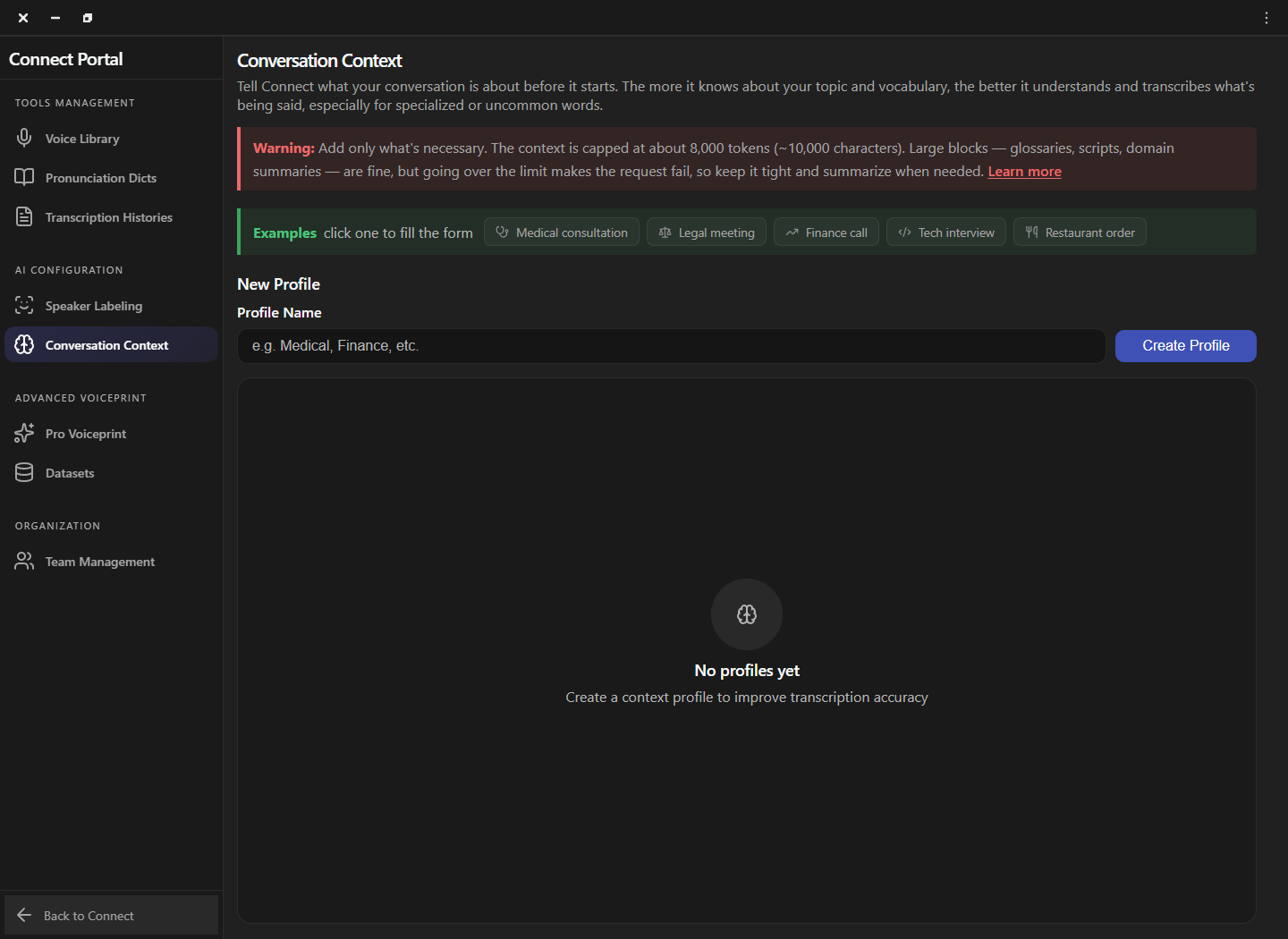
Write information Connect can use
Write plain, direct statements instead of promotional copy or long narrative paragraphs. Describe the task, likely speakers, expected terms, and ambiguous words with the meaning intended in this call. Include only information that improves recognition. A focused profile is easier to review, safer to reuse, and less likely to bias the transcript toward unrelated vocabulary.
| Include | Example | Why it helps |
|---|---|---|
| Topic | Renewal call for a cloud contact-center contract | Frames the vocabulary domain. |
| Roles | Support lead and customer administrator | Clarifies likely intent and turn-taking. |
| Terms | ACW, queue, wrap-up code, SLA | Provides uncommon expected vocabulary. |
| Names | Product and organization names needed in the call | Reduces ambiguity without adding unrelated data. |
Activate and compare the profile
Activate the profile before joining the call and keep the language pair, microphone, voice, and translation mode unchanged. Read several sentences that contain the specialist terms, then compare the transcript with the profile off and on. If ordinary words become less accurate, shorten the profile or remove terms that do not belong to the immediate conversation.
Maintain reusable profiles safely
Review a context profile whenever terminology, product names, or the call workflow changes. Create separate profiles for materially different domains instead of turning one profile into a universal glossary. Remove expired names and confidential details, and retest after major application updates. A short version history in the profile description can help teams understand what changed.
- One workflow per profile: keep medical, legal, sales, and technical calls separate.
- Review before reuse: confirm names and terms still belong to the current customer or case.
- Minimize sensitive data: use role descriptions and generic context whenever possible.
- Retest changes: compare a small representative phrase before a live conversation.
Frequently asked questions
These answers clarify the decisions that most often affect this workflow. Keep the working microphone, speaker, language pair, and call route unchanged while testing a feature, and return to the simplest verified baseline whenever several simultaneous changes make the result difficult to explain.
What belongs in a context profile?
Include the subject, participant roles, specialist terms, product names, abbreviations, and likely phrases needed for that repeatable call type.
Is context the same as a pronunciation dictionary?
No. Context helps recognition and transcription; a dictionary tells generated speech how a written term should sound.
Can I paste a complete script?
A focused summary is usually better. Keep within the limit shown by the application and remove unrelated or sensitive information.
How do I know the profile helps?
Compare the same representative phrases with the profile off and on while keeping every other setting unchanged.
Support
Need help? Get in touch with our Support Team for assistance. Include the feature, operating system, calling application, selected microphone and speaker, language direction, and the exact step that failed. Describe the expected result and what happened instead without including passwords, private call content, or unnecessary personal data.
Was this article helpful?