
Review minutes and persistent settings
Understand plan and purchased balances, usage estimates, profile preferences, transcription saving, and high-impact recovery controls.
Read the minutes overview correctly
The Manage page separates Total Remaining, Left On Plan, Purchased Minutes, and Used. Read each value before assuming a session was billed incorrectly. The application describes minutes as estimates and notes that processing modes can consume credits at different rates, so a displayed minute and actual call duration are not always identical.
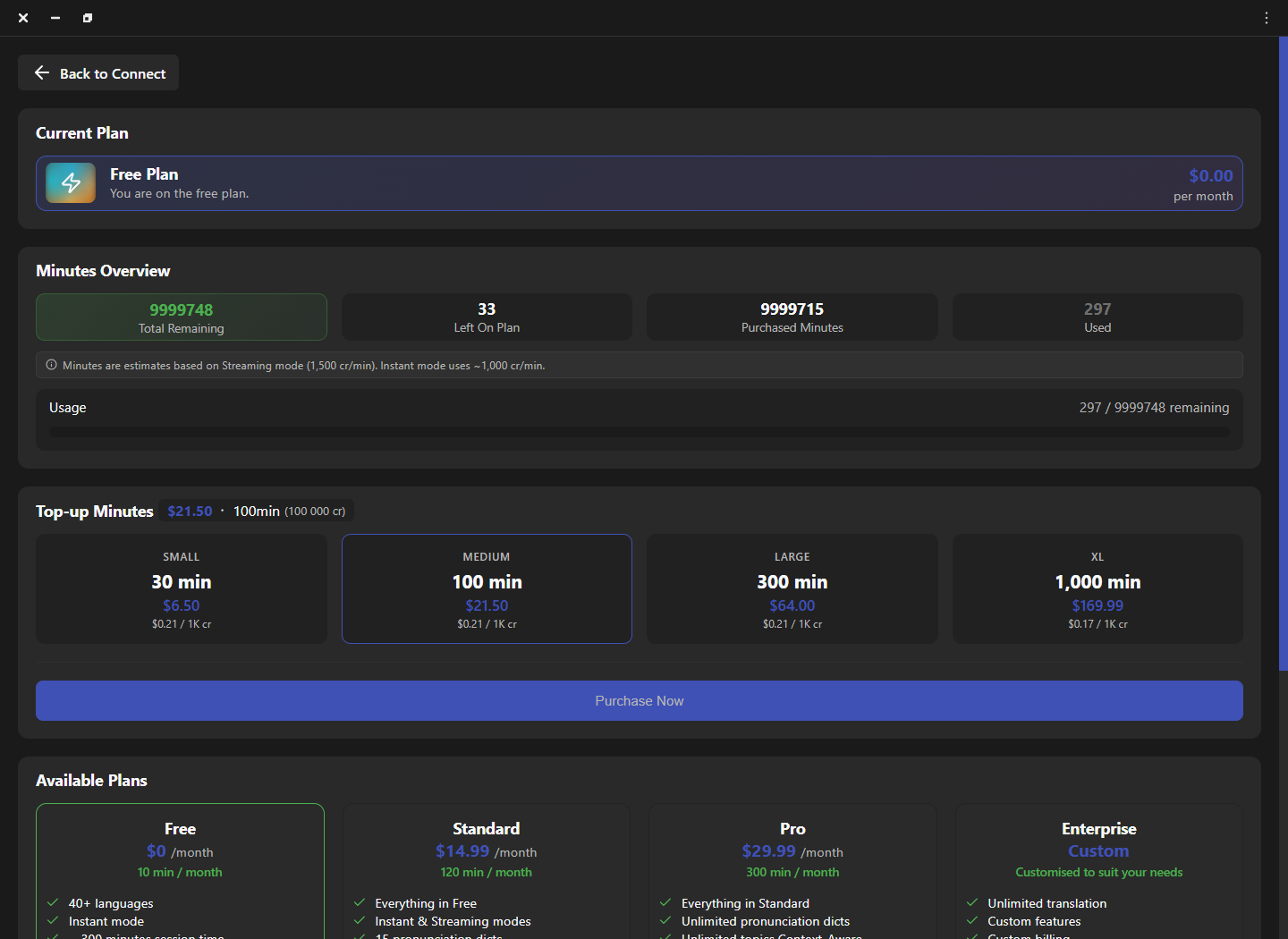
| Value | Meaning | Check |
|---|---|---|
| Total Remaining | The combined balance currently available. | Refresh after a completed session or purchase. |
| Left On Plan | The remaining allowance included with the active plan. | Compare with the plan renewal period. |
| Purchased Minutes | Additional top-up balance. | Compare with completed purchases and invoices. |
| Used | Recorded consumption for the displayed period or account. | Compare mode, session duration, and update time. |
Account for processing mode
The observed Manage page explains that Streaming and Instant modes use different approximate credit rates. Treat those values as the application’s current estimate, not a universal billing promise. If usage seems unexpected, record the selected mode, start and end time, session count, account, and displayed balances before and after one controlled call.
- Refresh once: allow a completed session time to post before comparing balances.
- Isolate one call: avoid simultaneous sessions when measuring a specific change.
- Record the mode: Instant and Streaming behavior can produce different estimates.
- Preserve evidence: capture values and timestamps without exposing payment or personal data.
Understand persistent preferences
Profile preferences can affect future sessions even when the main workspace looks unchanged. These can include region, email notifications, voice matching, default voice gender, streaming quality, auto-save transcription, crash reporting, and audio enhancement. Change one preference at a time, note the old value, and restart or place a fresh test call when the setting affects session initialization.
- Region: use the operational region assigned to the account or closest approved service area.
- Streaming quality: balance natural delivery and speed, then compare with the same phrase.
- Auto-save: choose an approved folder and confirm the retention policy before enabling.
- Voice matching: treat experimental matching as a feature to validate, not guaranteed identity.
Choose enhancement scope deliberately
Audio enhancement can focus on the main speaker or clean a broader audio scene, and the profile can apply processing to your side, the other side, both sides, or neither. Start with Off and solve physical microphone placement first. Enable only one enhancement and one side at a time, especially when the calling application also provides noise suppression or voice isolation.
Treat recovery actions as a last resort
Password changes, audio-driver removal, and account deletion are high-impact controls. Use them only for the problem they are designed to solve and only after preserving configuration details. Removing virtual drivers can break every integration until the drivers are reinstalled and the calling application is routed again. Account deletion can be permanent and should never be used for troubleshooting.
Frequently asked questions
These answers clarify the decisions that most often affect this workflow. Keep the working microphone, speaker, language pair, and call route unchanged while testing a feature, and return to the simplest verified baseline whenever several simultaneous changes make the result difficult to explain.
Why do used minutes differ from call duration?
Displayed minutes can be estimates based on processing mode and credit rate. Compare one completed call after balances refresh.
Do purchased minutes replace plan minutes?
The Manage page displays plan and purchased balances separately and combines them in Total Remaining. Follow the account’s current billing terms for consumption order.
When should I change streaming quality?
Change it before a controlled test, keep the same voice and phrase, and compare responsiveness and naturalness.
Should I uninstall audio drivers when sound fails?
Not as a first step. Verify physical devices, virtual routing, permissions, call detection, and device refresh before using driver recovery.
Support
Need help? Get in touch with our Support Team for assistance. Include the feature, operating system, calling application, selected microphone and speaker, language direction, and the exact step that failed. Describe the expected result and what happened instead without including passwords, private call content, or unnecessary personal data.
Was this article helpful?