
Create a voice variant
Build a target-language version from an existing voice while keeping naming, dialect, and validation easy to understand.
Start from a validated base voice
A variant adapts an existing voice to a target language; it does not fix a noisy or poorly recorded base voice. Preview the base voice first, confirm that the speaker identity and level are acceptable, and choose one specific language and dialect for the new version. Use a consistent naming pattern so the correct voice can be found quickly before a call.
- Base voice: use a voiceprint you already trust in its original language.
- Target language: match the language recipients will hear, not the language you speak.
- Dialect: choose only when a regional option is required and supported.
- Name: include the base identity, target language, and optional dialect.
Complete the variant dialog
Open Portal → Voice Library → Create Variant, select the base voice, and enter a recognizable new name. Choose the target language, optional dialect, and original speaker gender shown by the form. Review these fields before creating the variant because the language label becomes part of how the voice is discovered and selected later.
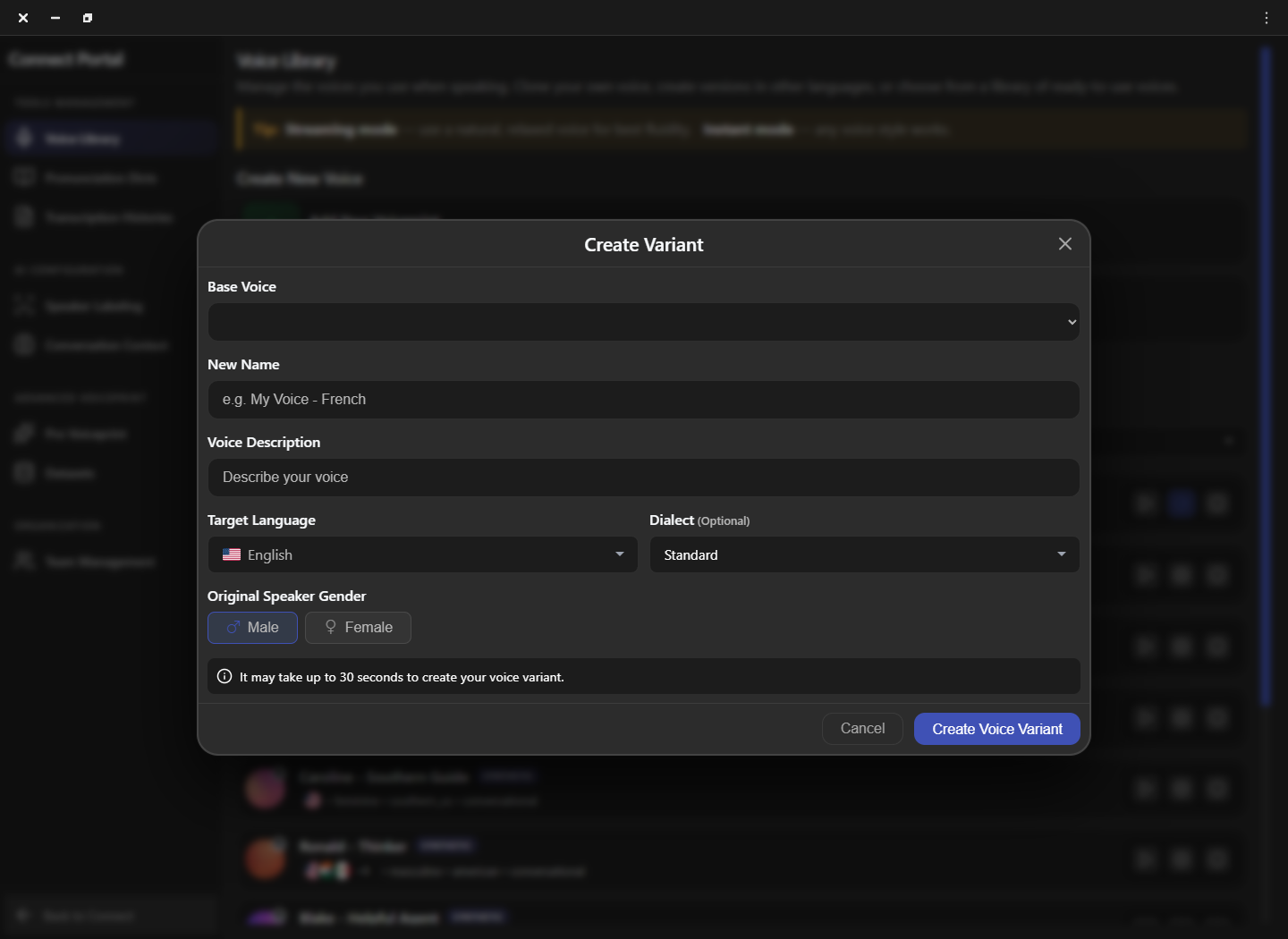
Name and organize reusable voices
A voice library becomes difficult to use when several variants share vague names such as “French voice” or “test.” Apply one naming convention, add a short description, and delete failed experiments only after confirming they are not used by another workflow. Filters for language, gender, category, accent, and voice type can then narrow the library without guesswork.
| Field | Good example | Avoid |
|---|---|---|
| Name | Alex — French (Parisian) | New voice 2 |
| Description | Customer support, calm delivery | Best one |
| Target | French / Parisian | A language not used by the call |
Compare the variant in a controlled test
Preview the base voice and the new variant with equivalent sentences, then use the variant in a short call. Listen for intelligibility, stable loudness, natural pacing, and names that may need a dictionary entry. Keep the same translation mode and audio devices during comparison. If the result is weak, verify the base sample before creating another variant.
Frequently asked questions
These answers clarify the decisions that most often affect this workflow. Keep the working microphone, speaker, language pair, and call route unchanged while testing a feature, and return to the simplest verified baseline whenever several simultaneous changes make the result difficult to explain.
Can a variant repair a poor base voice?
No. Re-record or replace a noisy, clipped, or unnatural base voice before creating variants.
Should I create one variant for every language?
Create only the languages and dialects that have a real workflow. Fewer well-labeled variants are easier to validate and maintain.
Why is the base voice list empty?
Create or obtain an eligible base voice first, then reopen the variant dialog. Plan limits or account permissions can also restrict available voices.
What should I test after creation?
Preview clarity and pacing, then place a short call using the same route and sentence used for the base voice.
Support
Need help? Get in touch with our Support Team for assistance. Include the feature, operating system, calling application, selected microphone and speaker, language direction, and the exact step that failed. Describe the expected result and what happened instead without including passwords, private call content, or unnecessary personal data.
Was this article helpful?